Kaca kamar mandi yang ngembun, di satu tab browser. Hembus napas, gambar pakai ujung jari, hapus pakai telapak. Halaman ini isinya satu hal: prompt build lengkapnya, siap kamu kasih ke AI coding agent.
Halaman ini isinya cuma satu hal: prompt-nya.
Fog Mirror itu kaca kamar mandi yang ngembun, tapi di tab browser. Tahan spasi buat ngembun, jepit jempol sama telunjuk buat gambar, buka lima jari buat ngehapus lebar. Hasilnya satu file HTML, dan ga ada satu frame pun yang keluar dari laptop kamu.
Satu hal sebelum mulai: getUserMedia cuma jalan di https atau localhost, jadi dobel klik file-nya ga bakal bisa. Jalanin python3 -m http.server 8787 di folder itu, terus buka http://localhost:8787/fog.html.
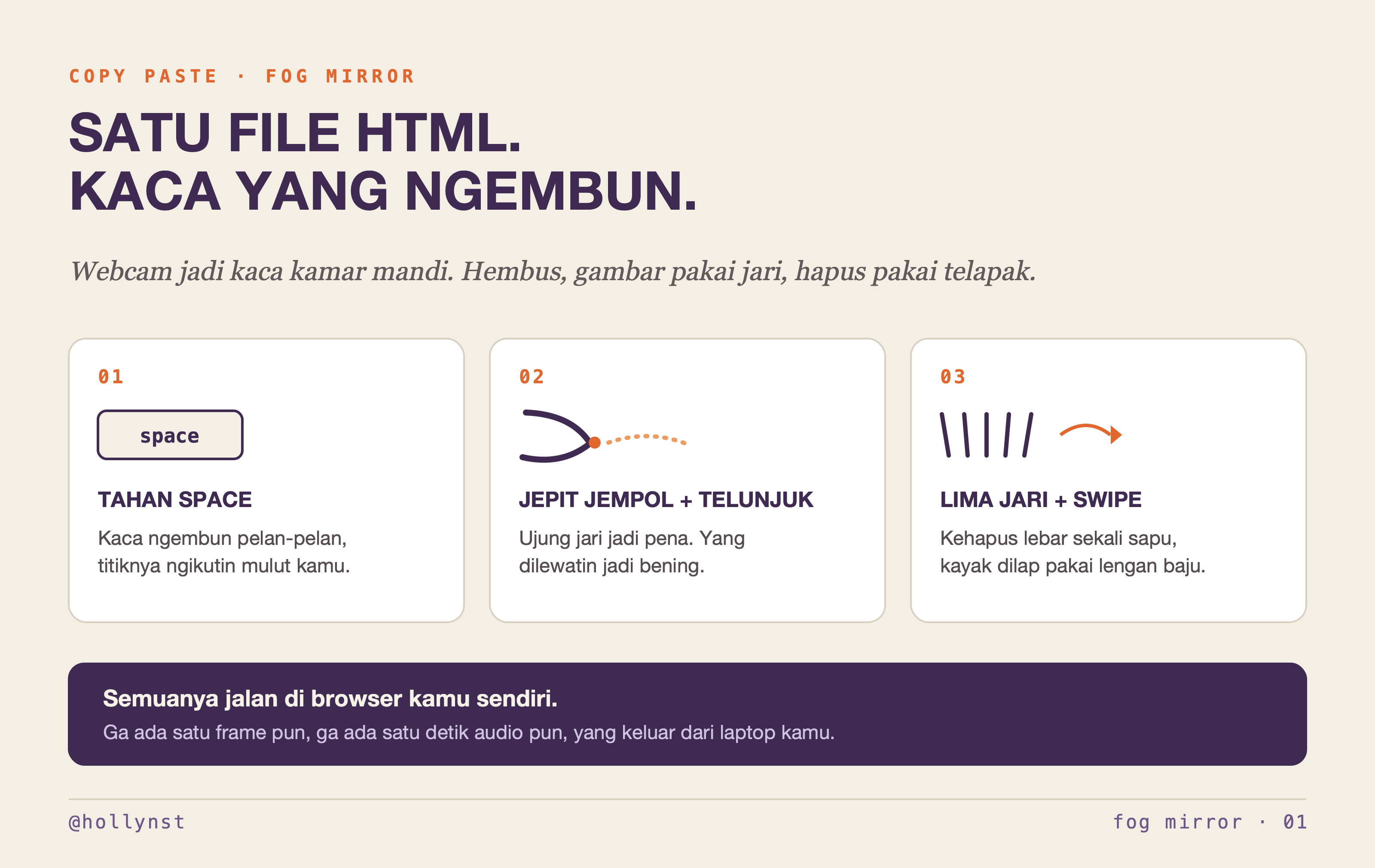
Prompt lengkapnya, tinggal copy
Blok di bawah ini isinya satu dokumen utuh. Copy semuanya, kasih ke AI coding agent kamu, dan minta dia bikin fog.html. Sengaja aku biarin bahasa Inggris, karena yang baca ini agent-nya, bukan kamu.
# FOG MIRROR — the complete build prompt

*A bathroom mirror that fogs up, in a browser tab. Breathe on it, draw through it with your fingers, wipe it with your palm.*

**Built by @hollynst — follow @hollynst for more.**

---

Hand this entire document to an AI coding agent, or to yourself on a quiet afternoon. It is the full specification: architecture, every tuned number, every gesture rule, and — more usefully — the failures that each produce something that looks finished and does nothing. Those are at the bottom. Read them before you start, not after.

---

## 0. THE BRIEF

Build a single self-contained HTML file called `fog.html`. No build step, no npm, no framework, no bundler. One file, everything inline.

The webcam is a mirror. The mirror has fogged up. You hold space and fog blooms across the glass. You pinch your thumb and index finger together and draw on it with your fingertip, and wherever you draw, the fog wipes away and your face shows through. Water beads gather on the line you drew and run down. You open your whole hand and swipe, and it clears a wide area like a sleeve.

Everything runs in the browser. No frame, no sample of audio, no byte of data leaves the machine. Say so on the start screen, because people should not have to take it on faith.

---

## 1. GROUND RULES

- **One file.** `fog.html`. Inline `<style>`, inline `<script type="module">`. The only external fetches are the MediaPipe runtime and its two model files, both from a CDN, both pinned.
- **`'use strict'` at the top and let exceptions throw.** Do not wrap the render loop in a try/catch. An undeclared variable read inside the loop kills the frame silently, and the symptom looks like a design problem rather than a crash. You will waste an hour.
- **`getUserMedia` only works on https or localhost.** Opening the file by double-clicking it (`file://`) fails. Serve it: `python3 -m http.server 8787 --bind 127.0.0.1`, then `http://localhost:8787/fog.html`.
- **Multiply every pixel size by `devicePixelRatio`, capped at 2.** On a retina screen a brush, canvas, or blur radius written in plain CSS pixels comes out half the size you intended. Define `const px = v => v * dpr` and route every measurement through it.

---

## 2. DEPENDENCIES — PINNED

```
https://cdn.jsdelivr.net/npm/@mediapipe/tasks-vision@0.10.14/vision_bundle.mjs
https://cdn.jsdelivr.net/npm/@mediapipe/tasks-vision@0.10.14/wasm
https://storage.googleapis.com/mediapipe-models/hand_landmarker/hand_landmarker/float16/1/hand_landmarker.task
https://storage.googleapis.com/mediapipe-models/face_landmarker/face_landmarker/float16/1/face_landmarker.task
```

Import `FilesetResolver`, `HandLandmarker`, `FaceLandmarker`. Pin the version. Unpinned versions pull a build that may not match this API.

Create each task with `runningMode: 'VIDEO'`, try the `GPU` delegate first and fall back to `CPU` in a catch. Load both with `Promise.allSettled` so one failing does not take the other down — hand tracking is the app, face tracking is a nicety.

```
HandLandmarker: numHands 2, minHandDetectionConfidence 0.5,
                minHandPresenceConfidence 0.5, minTrackingConfidence 0.5
FaceLandmarker: numFaces 1, outputFaceBlendshapes true
```

**Do NOT load MediaPipe's `camera_utils` helper.** Its `Camera.start()` calls `getUserMedia` a second time with its own width and height, silently overriding the resolution you asked for, and the picture goes soft. Feed frames yourself from one `requestAnimationFrame` loop.

**Ask for 720p.** `video: { facingMode: 'user', width: { ideal: 1280 }, height: { ideal: 720 } }`. Left alone a laptop camera will hand you 640×480. The fog hides it — but the whole point of the app is the strip you wipe clear, and that part is your own face at full size.

---

## 3. ARCHITECTURE — THREE LAYERS AND ONE TRICK

Four canvases. Only one of them is ever shown.

| canvas | size | what it holds |
|---|---|---|
| `view` | full, device px | what you see. The only one in the DOM. |
| `mask` | full, device px | **alpha = how much fog sits at each pixel.** Never drawn to screen. |
| `fog` | 30% of full | the camera, blurred cheaply at low resolution |
| `steam` | full, device px | fresh breath — whiter than settled fog, evaporates |

Every frame, in this order:

1. **The reflection.** Draw the video to `view`, mirrored horizontally so it behaves like a real mirror.
2. **The frost.** Draw the video again into the small `fog` canvas with `filter = blur(...) saturate(0.68) brightness(1.14)`, then flood it with tint and a little white. Upscale it onto a working layer, overlay the condensation grain, overlay `steam`.
3. **Cut it to shape.** `layer.globalCompositeOperation = 'destination-in'` and draw `mask` over it. *This is the whole illusion.* The frost now exists only where there is fog.
4. Draw the layer onto `view`. Then droplet glints, then the vignette, then the fingertip star, then the watermark.

**Erasing is subtraction from the mask.** `globalCompositeOperation = 'destination-out'`. You do not paint white and you do not paint the camera back in. Get this wrong and you end up painting a white smear that only ever gets whiter.

Rendering the blur at 30% scale matters: `blur(18px)` at full retina resolution will cost you the frame rate. Blur the small canvas, upscale with `imageSmoothingQuality = 'high'`.

### Two clocks, and neither one is the one you think

`requestAnimationFrame` runs at 60, 120, sometimes 144 Hz. The camera delivers 30. Nothing good comes of confusing them.

```js
if (video.readyState >= 2 && video.currentTime !== lastVideoTime) {
  lastVideoTime = video.currentTime; frames++;
  if (hands) drawing = processHands(now);
  if (face && frames % 5 === 0) processFace(now);
}
```

- **Only run detection when the video frame actually changed.** Otherwise you run two inferences per camera frame, halve your frame rate for nothing, and hand `detectForVideo` a timestamp that advanced while the picture did not.
- **Count video frames, not animation frames.** Every `% 2` and `% 5` in this document — breath blobs, face detection — counts the gated counter above. On a 120 Hz screen an rAF counter doubles the breath rate and the glass fogs twice as fast as it does on your laptop.
- **Cap `dt` at 0.1 s.** `const dt = Math.min(0.1, (now - lastT) / 1000)`. Switch tabs for a minute and rAF stops; the frame you come back to carries a `dt` of sixty seconds. Droplets teleport to the floor, the fog regrows completely, the steam is gone. One `Math.min` and none of it happens.

---

## 4. GEOMETRY

Work in **device pixels** everywhere. `W = innerWidth * dpr`, `H = innerHeight * dpr`.

```js
// video drawn "cover" style, mirrored
function coverRect() {
  const vw = video.videoWidth, vh = video.videoHeight;
  const s = Math.max(W / vw, H / vh);
  return { x: (W - vw*s)/2, y: (H - vh*s)/2, w: vw*s, h: vh*s };
}
function drawMirrored(c, scale) {
  const r = coverRect();
  c.setTransform(-scale, 0, 0, scale, W * scale, 0);
  c.drawImage(video, r.x, r.y, r.w, r.h);
  c.setTransform(1, 0, 0, 1, 0, 0);
}
// a normalized landmark -> device px on the mirrored screen
const toScreen = (p, r) => ({ x: W - (r.x + p.x * r.w), y: r.y + p.y * r.h });
```

On resize, copy the old mask into the new one before refilling, so whatever has been wiped survives: stash the old canvas, resize, flood with `startFog`, then draw the old one back with `'copy'`.

**Rebuild the grain pattern and the vignette gradient in `resize()` as well.** Both are canvas objects built against the old dimensions. Keep them and the grain tiles at the wrong scale while the vignette stops reaching the corners — and since both still render, nothing tells you the window resize is what broke them.

---

## 5. GESTURES — AND THE SINGLE MOST IMPORTANT RULE IN THIS DOCUMENT

### Use the 3D landmarks. Never the screen coordinates.

`HandLandmarker` returns both `landmarks` (normalized 2D + relative z) and `worldLandmarks` (metric 3D, in metres). **Every gesture test runs on `worldLandmarks`. Positions on screen come from `landmarks`.**

Here is why, and it is not a detail. A fist held with the knuckles toward the camera curls along the camera's own axis. Projected flat, the fingertips land *farther* from the wrist than their own joints:

```
same clenched fist:        index curl    fingers "extended"
measured in 2D (x, y)         1.89              4          -> wipes the mirror
measured in 3D (x, y, z)      0.72              0          -> correctly ignored
```

Build everything from two scale-free ratios, so they behave identically near and far from the camera:

```js
const d3 = (a,b) => Math.hypot(a.x-b.x, a.y-b.y, (a.z||0)-(b.z||0));

// >1 the finger reaches past its own middle joint; <1 it is folded away
const curl = (g, tip, pip) => d3(g[0], g[tip]) / d3(g[0], g[pip]);

// thumb-to-index, over hand size
const pinchRatio = (g) => d3(g[4], g[8]) / d3(g[0], g[9]);
```

Landmark indices: `0` wrist · `4` thumb tip · `5` index knuckle · `6` index middle joint · `8` index tip · `9` middle knuckle · `10/12` middle · `14/16` ring · `17` pinky knuckle · `18/20` pinky.

**Guard every division.** `d3(g[0], g[9])` is zero on a degenerate frame and the ratio comes back `NaN`. Every comparison against `NaN` is false, so nothing throws, nothing logs, and the app just quietly stops answering your hands. `Math.max(1e-6, denominator)`, in both ratios, always.

### Two hands, two of everything

`numHands: 2`, so every piece of state — the smoothed landmark set, pen up/down, the release counter, the wipe cursor, the palm position and its timestamp — lives **per hand**, in a `Map` keyed by `res.handednesses[i][0].categoryName`. One hand can draw while the other wipes and neither needs to know.

Three things bite here:

- **Both hands sometimes come back labelled `Right`.** The keys collide and two hands silently merge into one cursor that jumps between them. If the key is already taken this frame, append the index.
- **`worldLandmarks` can be absent on a frame.** Fall back to the normalised set — `res.worldLandmarks?.[i] || lm`. The ratios are wrong for that one frame, which is survivable. A thrown exception inside the loop is not.
- **Prune the map.** Delete a hand 700 ms after it was last seen, or the fingertip ring from a hand that left the frame hangs on the glass forever.

**Smooth the screen landmarks on arrival**, the whole 21-point set, 0.6 toward the new positions. The fingertip, the palm centre and the measured hand width all stop shivering at once. The gesture tests keep reading the **raw** 3D set — smoothing a shape test only makes it answer late.

### One shared boundary between fist and pinch

A pinch bends the index finger. That is most of what a fist looks like. If you write a separate test for each, they overlap, and whether a pinch registers comes down to which side of the gap a given frame lands on — it works, then it doesn't, and you cannot tell why.

**Use one number for both.**

```js
const INDEX_FOLDED = 0.82;
const indexNotCurled = (g) => curl(g, 8, 6) > INDEX_FOLDED;
const clenched = (g) => curl(g, 8, 6) < INDEX_FOLDED
                     && curl(g, 12, 10) < 0.9
                     && curl(g, 16, 14) < 0.9
                     && curl(g, 20, 18) < 0.9;
```

Below 0.82 the index is folded away and it is a fist. Above, it is merely bent, which is what a pinch looks like. No gap. No overlap.

### Pinch — the pen

```
pen down   pinchRatio < 0.27  AND  indexNotCurled  AND  not clenched
pen up     pinchRatio > 0.45
between    hold whatever state you were in
```

Two thresholds so it cannot chatter. The index check runs **only at pen-down, never mid-stroke** — one bad frame would otherwise cut the line in half.

A fist must not be able to start a stroke, but **the fist check must not kill a stroke already in progress.** Let the ordinary pen-up path handle it: a fist's own thumb spacing sits above 0.45 anyway.

### Open palm — the sleeve

**All five fingers out, or it does not erase.** Four fingers is not enough: when you pinch, your other three fingers curl on their own, and when you raise an open hand into position to start drawing, you are holding up exactly the shape a four-finger test is looking for. It will wipe out the drawing you just made.

The thumb is what makes it unambiguous, because in any pinch the thumb is touching the index:

```js
const thumbOut = (g) => d3(g[4], g[5]) > d3(g[0], g[9]) * 0.55
                     && pinchRatio(g) > 0.85;

function openPalm(g, already) {
  const n = fingersOut(g);           // count of curl(tip,pip) > 1.12
  const r = pinchRatio(g);
  return already ? (n >= 3 && r > 0.70 && thumbOut(g))
                 : (n === 4 && thumbOut(g));
}
```

Then **three more locks**, every one of them earned:

1. **It has to be moving.** Shape alone is not a gesture. An open hand simply being in frame is the most ordinary thing a hand does. Require the palm centre to travel faster than `0.34 × short edge` per second to *start* a wipe, and faster than `0.11 ×` to keep one going. It may fall below that for 260 ms mid-swipe without dropping, so the wipe does not stutter.
2. **It has to hold.** Five consecutive frames of the five-finger shape before a wipe may begin. A hand passing through some open-looking pose on its way somewhere cannot trigger one.
3. **Not just after drawing.** No wipe within 700 ms of the pen being down. You drew it; the hand you are lowering is not going to sweep it away.

Verify your implementation against all of these before you believe it:

```
                          fingers  pinchRatio  thumbOut   result
fist                         0        0.50      false     nothing
fist, thumb on index         0        0.10      false     nothing
firm pinch, fingers in       1        0.08      false     DRAWS
pinch                        1        0.12      false     DRAWS
loose pinch, fingers out     4        0.07      false     DRAWS
flat hand, thumb tucked      4        0.49      false     nothing
five out, thumb away         4        1.57      true      WIPES
```

The fifth row is the one that catches people. A relaxed pinch has all four fingers reading as extended. Only the thumb saves you.

---

## 6. DRAWING

**Smooth three times, each for a different reason.** The landmark set is already eased at 0.6 on arrival (§5). On top of that:

```js
aim  = lerp(aim,  indexTip, 0.45);   // the eased landmark, eased again
pen  = lerp(pen,  aim,      0.22);   // the brush chases that
star = lerp(star, aim,      0.55);   // the glint rides ahead, on the fingertip
```

One pass still looks jittery; two looks like a pen. The star is deliberately the fastest of the three, so the feedback sits on your fingertip while the ink trails behind it — the other way round and the pen feels broken.

**Connect points with `quadraticCurveTo` through the midpoint of each pair**, not straight lines, or corners come out as visible angles. Keep a rolling buffer of three points and draw only the newest segment each frame:

```js
m0 = mid(p0, p1); m1 = mid(p1, p2);
ctx.moveTo(m0); ctx.quadraticCurveTo(p1, m1);
```

Stroke it twice into the mask with `destination-out` — a soft fringe at `lineWidth = radius * 2.5, alpha 0.34`, then a core at `radius * 1.7, alpha 0.98`. The core clears almost completely; the fringe keeps the edge from looking cut with scissors.

**Ignore movement under `0.0006 × screen width` as tremor.**

**If the hand vanishes for a frame, do not lift the pen.** Require 2 consecutive released frames *and* 250 ms before letting go.

**Pause the fogging while someone is drawing** (600 ms of grace), or they erase and it re-fogs at the same time and the drawing never finishes.

Brush radius is in CSS px, default 15, range 7–38, multiplied by dpr at the point of use.

---

## 7. THE SLEEVE WIPE

- The thing that moves is not the fingertip. Take the palm as `lerp(wrist, middle knuckle, 0.55)` — a single stable point near the heart of the hand. Fingertips swing about on their own while the hand itself holds still, and the speed test reads that as a swipe.
- Radius `1.4 × hand width`. Measure hand width as `max(index knuckle → pinky knuckle, wrist → middle knuckle)` — a hand turned side-on flattens the first measurement and the wipe shrinks to nothing.
- **Erase per distance travelled, never per frame.** Lay one soft radial stamp every half-radius of movement. Per stamp `alpha 0.34` — about 66% clear in one pass, 89% in two.

Per-frame is wrong twice over: a hand sweeping past covers the same point for a dozen frames and they compound to a full erase, and scaling by hand speed is backwards, because a faster hand spends *fewer* frames over each point.

- **Cap it at 40 stamps in one frame.**
- **If the hand appears to have moved more than 30% of the screen since the last frame, skip the interpolation and stamp once at the new position.** Hand tracking drops out and re-acquires constantly; without this one bad frame paints a long clean streak across the whole mirror.
- **Reset the wipe cursor on the frame a wipe begins**, not on the frame it ends. A stale cursor from the last swipe interpolates a stripe between the two.
- A wipe pauses the fog for 500 ms, the same way drawing pauses it for 600. It also drops the pen and empties the stroke buffer: the hand that is wiping is not also drawing.
- While wiping, the glint rides the **middle knuckle** rather than the fingertip, at 1.5× the brush size — big and central, so it reads as a palm and not as a pen.

---

## 8. DROPLETS

Only a drawn line sheds these. Breath does not — fog that condenses out of nowhere into running water looks wrong and gets in the way.

A droplet is a **thread, not a blob.** The temptation is to make the bead big enough to admire. Don't; it reads as a slug crawling down the glass. Born at **3.5–7% of the width of the line that fed it.**

Each frame, for each live drip, three passes into the mask with `destination-out`:

```
damp edge   lineWidth r * 2.1    alpha 0.16
core        lineWidth r * 0.95   alpha 0.92     (minimum 0.9 device px)
head        soft radial stamp, radius r * 1.1, alpha 1
```

Behaviour:
- accelerate at `170 px/s²`, cap `300 px/s`
- **beads hang before they run** — start paused 0.1–0.65 s, and at random (≈0.55 × dt) stop again for another 0.15–0.85 s. A drip that falls smoothly from birth to floor looks like a progress bar.
- wander sideways with `sin(wobble) × step × 0.05`
- taper: `r *= 1 - step * 0.0026 / dpr`. The thread narrows as it runs and dies, instead of holding one width to the bottom.
- die at `r < 0.5 px`, or past the bottom, or at end of life

Then paint the bead **on top of the finished composite**, never into the mask — this is what makes it read as water rather than a hole:

- a touch of shade under it, `rgba(10,4,28,.2)`
- a meniscus ring, `rgba(190,156,255,.42)`, hairline width
- **one small glint**, an ellipse at 30% up and left — not a glowing gradient blob
- **the bead stretches vertically while falling** (`ry × 1.35, rx × 0.86`) and goes round again when it stops. Real ones do this and your eye knows it even if you have never thought about it.

Spawn chance per segment: `segLen * 0.004 / dpr`. Cap the pool at 80.

---

## 9. BREATH AND FOG

**Default: the glass only fogs while the space bar is held.** Make the microphone an opt-in toggle. Automatic breath detection is a beautiful idea that, in a room with a fan, a keyboard, or another human, fogs the screen while you are trying to draw on it. Ship it off.

A breath scatters **12 soft blobs, every other frame**:

- centred slightly below the mouth — `+0.10 × reach` — because breath falls
- spread **1.45× wider horizontally** than vertically, because breath drifts sideways
- reach `0.43 × the screen's short edge`
- each blob's own softness is **0.60 of its radius**: a radial gradient solid to 0.40, fading to nothing at 1.0
- **per-blob opacity 0.36.** Keep it low and let overlap build the density, or you get one flat white disc
- find the face every 5th frame and **ease the fog centre toward the mouth at 0.4 per frame**, so it trails instead of snapping

### Where the breath comes from

The mouth is the midpoint of face landmarks **`13`** (upper lip) and **`14`** (lower lip). Four rules around it:

- **Only trust it for 900 ms.** Past that, leave the fog centre wherever it was rather than snapping somewhere wrong.
- **Until a face has ever been seen, breathe from `(0.5 W, 0.42 H)`** — a little above centre, where a face usually is. Fogging from the dead middle of the screen looks like a bug.
- **An open mouth fogs the glass.** `outputFaceBlendshapes: true` gives you `jawOpen`: open above **0.38**, closed below **0.25**. Hysteresis again, or the fog strobes while you talk. An open mouth seen within the last 400 ms counts as a breath of strength 0.8. Do this only when the mic is on — with it off, the space bar is the only thing that fogs the glass, and that promise is worth keeping literally.
- **Nothing fogs while the pen is down.** Not reduced. Suppressed.

Each blob goes into the mask with `'lighter'` (white) and into `steam` with `source-over` (a touch of violet-white). The steam layer is composited *into the frost before the mask cut*, so that wiping also removes fresh breath — otherwise you clear the glass and the bright patch of your last exhale stays floating on top.

Steam evaporates on a 1.6 s half-life, **applied in coarse 0.2 s steps** — tiny per-frame alphas stall out on 8-bit rounding and never reach zero.

### If you do turn the microphone on

Three things will fight you, and the first one is fatal:

```js
audio: { echoCancellation: false, noiseSuppression: false, autoGainControl: false }
```

**The browser's noise suppression is specifically designed to delete the sound of breathing.** Called normally, `getUserMedia` leaves a person able to blow as hard as they like while the level barely moves. Measured on a MacBook's built-in mic: peak went from 0.017 to 0.075. Four times. Without this, the breathing half of the app does not exist.

**Peak, not RMS.** `analyser.fftSize = 1024`, `smoothingTimeConstant = 0.1`, then take the largest absolute sample of `getFloatTimeDomainData`. A breath is broad and quiet; averaged across 1024 samples it vanishes into the room.

**Smooth the level asymmetrically**: 0.65 of the way toward a rising level, 0.22 toward a falling one. A breath has to register the instant it starts, and fade slowly enough that the fog does not flicker through it.

**The threshold has to float on the room's noise floor.** A fixed number works in one room and fails in the next. Trigger on `level > floor + 0.0025`, full strength at `floor + 0.003`. Let the floor chase the level asymmetrically — when the level is below the floor, move the floor 5% of the way down each frame; when above, move it up only 0.08% per frame.

**Start the floor high** — 0.05 — and let it fall into the room over the first second. Start it at zero and every room on earth reads as a gale until it catches up.

Do **not** use the minimum of the last N frames. A hard minimum gets pinned by one quiet moment, then every normal sound reads as breath and the screen fogs up by itself in any room that is not silent.

**Ignore the 300 ms after any keystroke**, or typing fogs the screen.

### Fog coming back

A wiped spot clouds over again across 20 seconds, as a linear alpha add (`'lighter'`, accumulating a fractional counter and applying whole 1/255 steps) so faint spots don't stall on rounding. Pausable with a key, because sometimes you want the drawing to stay.

---

## 10. THE LOOK

A dark violet, slightly clinical palette. Mono type throughout, letter-spaced wide. The fog is lit violet rather than warm — it is a mirror in a nightclub bathroom, not a spa.

```
--void      #0a0616      --violet       #a475ff
--void-2    #120a2a      --violet-hot   #c9a6ff
--ink       #ded2ff      --glass        rgba(26,16,54,.44)
--ink-dim   #8e82b8      --glass-line   rgba(164,117,255,.30)
font: ui-monospace, "SF Mono", "JetBrains Mono", "IBM Plex Mono", Menlo, monospace
```

**Fog colour:** blur 18 CSS px, `saturate(0.68) brightness(1.14)`, then flood `rgba(150,116,255,0.30)` and `rgba(255,255,255,0.34)`. Fog that is only blurred does not read as fog — it needs a little white mixed in.

**Condensation grain** — do not skip this, it is most of the texture. A 256×256 tile, generated once:
- per-pixel noise, `v = 198 + random()*52`, written violet-leaning as `(v-16, v-28, v+14)` with alpha `random()*48`
- 760 tiny beads, each a dark dot `rgba(78,56,138,…)` offset half a pixel down-right, with a bright `rgba(226,212,255,…)` dot on top — a shadow and a highlight, which is what makes them look spherical

Tiled over the frost at alpha 0.55, scaled `dpr * 0.72`.

**Vignette:** a radial gradient over the finished frame, transparent at the centre to `rgba(9,4,26,.52)` at the corners. Pulls the whole mirror back into the violet.

**Watermark:** a violet dot plus `@hollynst` in 11px mono with 0.24em tracking, top-left, drawn **onto the canvas** — not into the DOM — so it is part of every saved photo.

**Start screen:** the title in mono uppercase at 0.34em tracking with a violet glow, a hairline rule, a radial violet bloom behind it, and faint 3px horizontal scanlines masked to a soft oval. One button. The privacy line. The `@hollynst` credit at the bottom.

---

## 11. UI CHROME

All of it on the same frosted-glass pill: `rgba(26,16,54,.44)`, 1px `rgba(164,117,255,.30)` border, `backdrop-filter: blur(16px) saturate(1.3)`, and an inset top highlight.

- **brush slider**, bottom left. The lowercase word `brush` to the left of the track. Range 7–38, default 15, violet thumb with a glow. Keep the label lowercase and keep it in that corner.
- **shutter**, bottom right. A 52px circle with a ringed dot inside. Scales to 0.93 on press.
- **hint**, bottom centre, fades out after a few seconds.
- **breath meter**, top right. Honest: it shows the space bar when the mic is off, the mic level when it is on.
- **fingertip feedback**: a bright four-point star when the pen is down, and a **faint violet ring when a hand is tracked but not drawing** — so a pinch that did not take is visibly a pinch that did not take, rather than a mystery. Show the ring only for a hand seen within the last 200 ms, or it lingers after the hand is gone.

Two bits of plumbing, and the first one will cost you an evening if you miss it:

- **Blur the control the moment you are done with it.** `brushEl.blur()` on `change`, `shutter.blur()` on click, `preventDefault()` on the slider's own `keydown`. A focused range input swallows the space bar and the arrow keys — so the glass stops fogging, and space starts re-firing whichever button you touched last. Nothing about the symptom looks like a focus problem.
- **`setPointerCapture` on pointerdown** in the mouse fallback, so a drag that runs off the edge of the window keeps drawing instead of stopping dead at the border.

---

## 12. CONTROLS

| key | does |
|---|---|
| `space` (hold) | fog the glass |
| pinch | draw |
| five fingers + swipe | wipe wide |
| `c` | clear the drawing — fog over completely |
| `s` / shutter | save a PNG, watermark included |
| `f` | freeze the fog so a drawing stays |
| `w` | palm wipe on / off |
| `m` | microphone breath on / off |
| `[` `]` | brush size |
| `h` | show the hint |
| `esc` | back to the start screen |
| mouse drag | draw, if you have no hands in frame |
| shift + drag | wide wipe |
| `b` (hold) | breathe at the mouse pointer |

`[` and `]` **scale** the brush by 1.18 rather than stepping by one: at radius 7 a step of one is a third of the brush, and at 38 you cannot feel it. Shift-drag wipes at `5 × brush`.

Give every destructive-feeling control a way back, and give the gesture features a kill switch. When a gesture misfires, the person using it needs a key they can hit *now*, not a bug report.

Saving: `view.toBlob` → object URL → `<a download>` named `fog-mirror-<timestamp>.png`, revoked after a few seconds. Flash the screen white for one frame.

---

## 13. THE START SCREEN

Camera and microphone permission must be asked for by a real click, so open on a start screen: the name, one line of what it is, one button, and the promise that nothing is uploaded.

Then handle the refusals properly, because a black rectangle is not an error message:

- **camera + mic refused together** → retry with camera alone, and tell them space still fogs the glass
- **camera refused** → say exactly that: *"the camera was refused. allow camera access for this page and press the button again."*
- **opened as `file://`** → detect `location.protocol` and say *"the camera is blocked because this page was opened as a file. serve the folder over http://localhost and reload."*
- **MediaPipe failed to load** → fall back to mouse drawing and say so

---

## 14. WHAT WILL SILENTLY BREAK IT

Each of these produces something that looks finished and does nothing.

1. **Measuring gestures in 2D.** A fist pointed at the camera reads as four extended fingers. Use `worldLandmarks`. This is the big one.
2. **Separate thresholds for fist and pinch.** They overlap; recognition becomes a coin flip. One shared boundary.
3. **Testing hand *shape* without hand *motion*.** An open hand in frame is not a gesture, it is a hand. Require movement.
4. **Browser noise suppression**, if you use the mic. It exists to erase exactly the sound you are listening for.
5. **A fixed breath threshold, or a min-of-last-N floor.** Works in your room, fails in theirs. Float it asymmetrically.
6. **Forgetting `devicePixelRatio`.** Everything comes out half size on a retina screen, and the fix is not obvious because it still looks *plausible*.

And five more that cost me real time:

7. **A fist check that bails out of the whole frame.** It will cut live strokes in half every time a pinch wanders near the boundary. Guard what *starts*, never what is already running.
8. **Erasing per frame instead of per distance.** A slow hand erases ten times more than a fast one, which is exactly backwards.
9. **A focused slider.** Touch the brush control and the space bar belongs to it, not to you. Blur every control after use.
10. **An uncapped `dt`.** The app survives everything except being left in a background tab.
11. **An unguarded division in a gesture ratio.** One `NaN` and every test is false forever after on that hand. No error, no log, no hands.

Each of the eleven took the same shape: the thing rendered, the console stayed empty, and the only evidence was that the app felt wrong. Trust that feeling. It is always one of these.

---

## 15. EVERY TUNED VALUE

```js
const S = {
  startFog:    0.55,   // how fogged the glass is on arrival
  blur:        18,     // css px
  brightness:  1.14,
  tint:        '150,116,255',
  tintAmount:  0.30,
  whiteMix:    0.34,
  grain:       0.55,

  breathReach: 0.43,   // of the short edge
  blobs:       12,
  blobAlpha:   0.36,
  blobSpreadX: 1.45,
  blobDrop:    0.10,
  mouthEase:   0.40,
  autoBreath:  false,  // microphone off by default

  penDown:     0.27,   // pinch ratio
  penUp:       0.45,
  aimEase:     0.45,
  penEase:     0.22,
  starEase:    0.55,
  tremor:      0.0006, // of screen width
  liftMs:      250,

  wipeMult:    1.4,    // of hand width
  wipeGo:      0.34,   // short edges per second, to start wiping
  wipeKeep:    0.11,   // and to keep wiping
  wipeGrace:   260,    // ms it may slow mid-swipe
  palmHold:    5,      // frames of five-finger shape before arming
  wipeLock:    700,    // ms after a stroke in which nothing may wipe
  palmWipe:    true,
  wipeStamp:   0.34,   // ~66% clear in one pass, 89% in two
  wipeCap:     40,     // stamps per frame
  wipeJump:    0.30,   // skip interpolation past this much of the screen

  regrowSec:   20,
  regrow:      true,
  steamSec:    1.6,    // half-life of fresh breath
};

// the rest of the numbers, the ones that are easy to leave out
const VIDEO       = { w: 1280, h: 720 };  // ideal; do not accept 640x480
const DT_CAP      = 0.1;    // s, or a background tab fast-forwards everything
const PT_SMOOTH   = 0.6;    // screen landmarks, eased on arrival
const FACE_EVERY  = 5;      // video frames
const BREATH_EVERY= 2;      // video frames
const TRACK_TTL   = 700;    // ms before a vanished hand is forgotten
const RING_TTL    = 200;    // ms the idle fingertip ring outlives its hand
const PAUSE_DRAW  = 600;    // ms of no fogging after drawing
const PAUSE_WIPE  = 500;
const PALM_AT     = 0.55;   // lerp(wrist, middle knuckle)
const MIC         = { fft: 1024, smooth: 0.1, attack: 0.65, release: 0.22,
                      floor0: 0.05, floorDown: 0.05, floorUp: 0.0008 };
const JAW         = { open: 0.38, shut: 0.25, strength: 0.8 };
const MOUTH_TTL   = 900;    // ms; 400 for the open-mouth trigger
const EPS         = 1e-6;   // every ratio denominator goes through Math.max

const INDEX_FOLDED = 0.82;   // the fist / pinch boundary
const FOG_SCALE    = 0.30;   // blur is cheap at low resolution
```

---

## 16. HOW TO KNOW IT WORKS

Test these in order. Each one has failed for me at least once.

1. Hold space → fog blooms, centred under your mouth, and drifts sideways.
2. Pinch and move → a smooth line clears through to your face. No visible corners. No jitter.
3. Pinch, draw, release, **make a fist** → nothing happens. Nothing at all.
4. Pinch, draw, release, **lower your open hand** → your drawing survives.
5. Hold an open hand perfectly still in frame → nothing happens.
6. Open hand, five fingers, swipe → a wide clean sweep.
7. Draw a long line → two or three thin threads run down from it and stop and start.
8. Press `s` → a PNG lands in your downloads with `@hollynst` on it.
9. Resize the window → whatever you wiped is still wiped, the grain is the same size, the vignette still reaches the corners.
10. Draw with both hands at once → two lines, neither one jumping to the other hand.
11. Click the shutter, then hold space → the glass still fogs. (This is the focus trap. It will have caught you.)
12. Start a stroke and drag the pointer off the edge of the window → the line keeps up.
13. Switch to another tab for a minute, come back → no droplets on the floor, no screen that re-fogged itself solid.
14. Open the console → nothing in it.

---

## 17. MAKE IT YOURS

The architecture is fixed — three layers, mask-as-alpha, `destination-out`, 3D gestures. Everything else is yours to move:

- the palette and the type; warm it up, go monochrome, make the fog read as actual steam
- the gestures: two hands drawing at once, a thumbs-up to save a photo
- what the fog *is* — frost crystals, rain on a window, dust on a screen
- what happens when the glass is fully clear — there is a moment there nobody has used yet

---

*Built by @hollynst. If you build one, I want to see it.*

→ follow @hollynst for more
Bagian nomor 16 itu daftar cara ngetesnya. Mulai dari situ kalau hasilnya kerasa aneh.
Palet, tipografi, dan embunnya itu apa, semuanya bebas kamu ganti. Kalau kamu bikin satu, aku mau liat.
Tag atau DM aku hasil screenshot-nya. Yang paling aku penasaran: gambar apa yang kamu bikin di kacanya.
Kirim hasilnya ke @hollynstWritten by Holly in Beijing. Notes get longer as I learn more. If you spot something off, find me in the footer.