Angkanya dulu sebentar, terus langsung ke bagian yang kepake: demo resmi Google satu-satu, plus empat prompt panjang yang bisa kamu copy langsung buat ngulangin sendiri — sketsa 2D jadi arsitektur 3D, sketsa tangan jadi desain hardware, game pixel-art, dan simulasi interaktif.
Google baru rilis frontier model baru mereka: Gemini 4 Argon. Diumumin 30 September, dan dibuka buat developer sama bisnis tanggal 13 Oktober.
Yang dikejar model ini tugas panjang, coding level production, sama reasoning yang berlapis. Dia juga punya output decode window satu juta token, dan itu angka yang belum pernah ada di model lain.
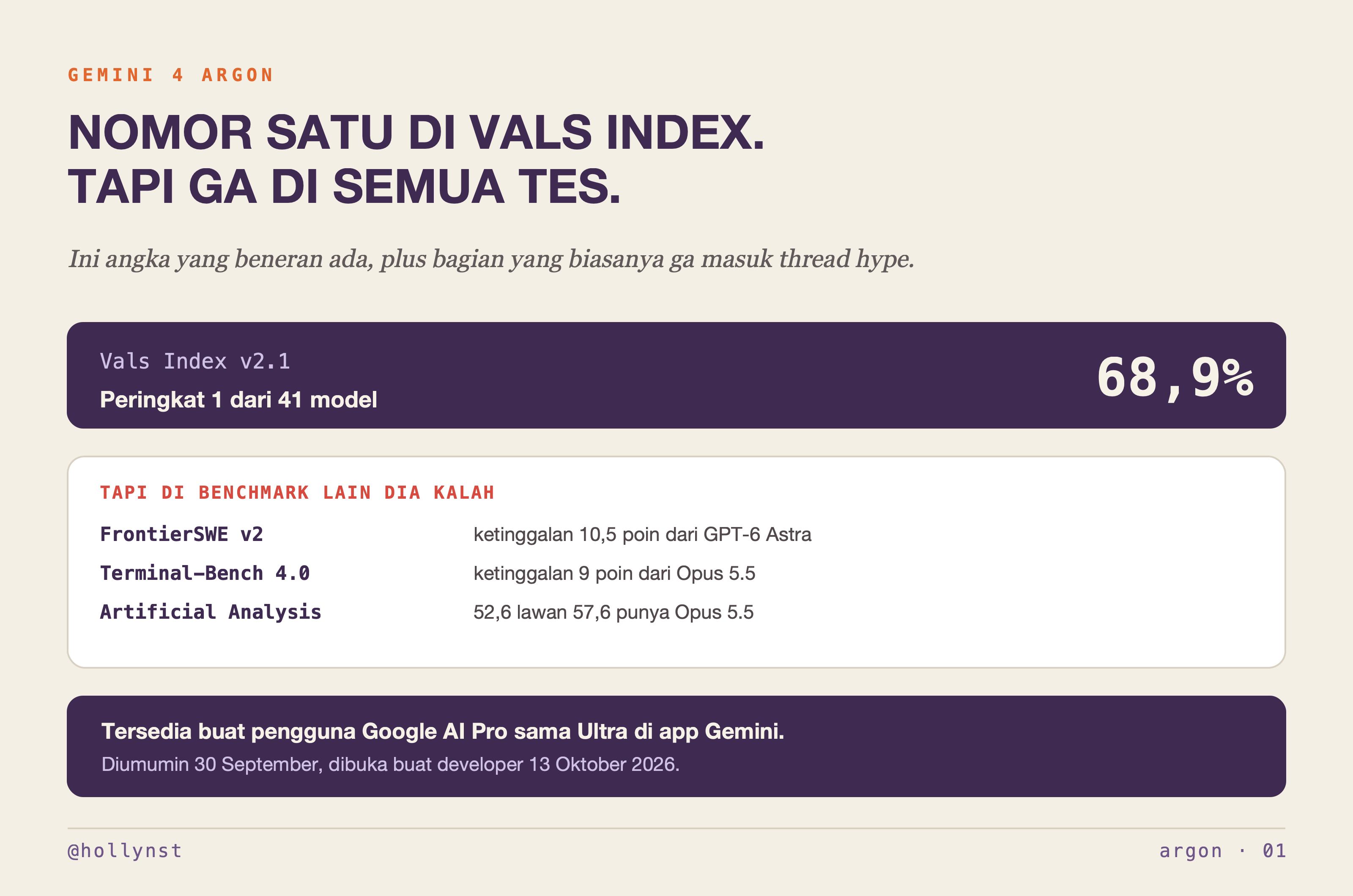
Headline-nya: dia nomor satu di Vals Index, tes yang ngukur kerjaan nyata di bidang finance, coding, legal, sama tax. Skornya 68,9% dan dia peringkat satu dari 41 model.
Tapi itu satu benchmark, bukan ranking umum. Di FrontierSWE v2 dia ketinggalan sekitar 10,5 poin dari GPT-6 Astra, di Terminal-Bench 4.0 sekitar 9 poin dari Opus 5.5, dan Artificial Analysis ngasih dia 52,6 lawan 57,6 punya Opus 5.5. Dua-duanya bener, dan yang kedua jarang ikut dikutip.
Tapi bukan itu yang mau aku bahas panjang di sini. Yang lebih kepake buat kamu adalah bagian yang orang cuma liat videonya: demo-nya, dan prompt buat ngulangin sendiri.
Yang bikin aku penasaran: dia bisa bikin apa
Bagian demo-nya yang menarik. Argon bisa bikin simulasi interaktif sama visualisasi 3D yang langsung kebuka di browser, dan di beberapa demo resmi Google dia dipakai buat hal yang lebih konkret dari jawaban teks panjang.
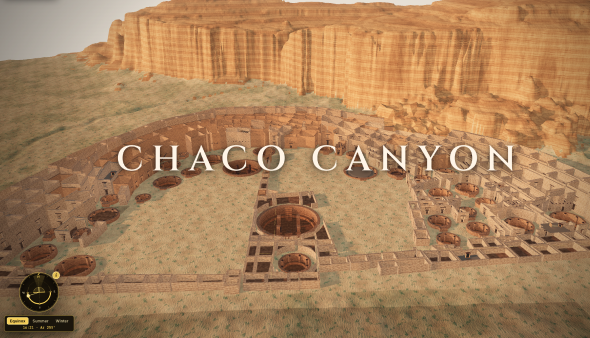
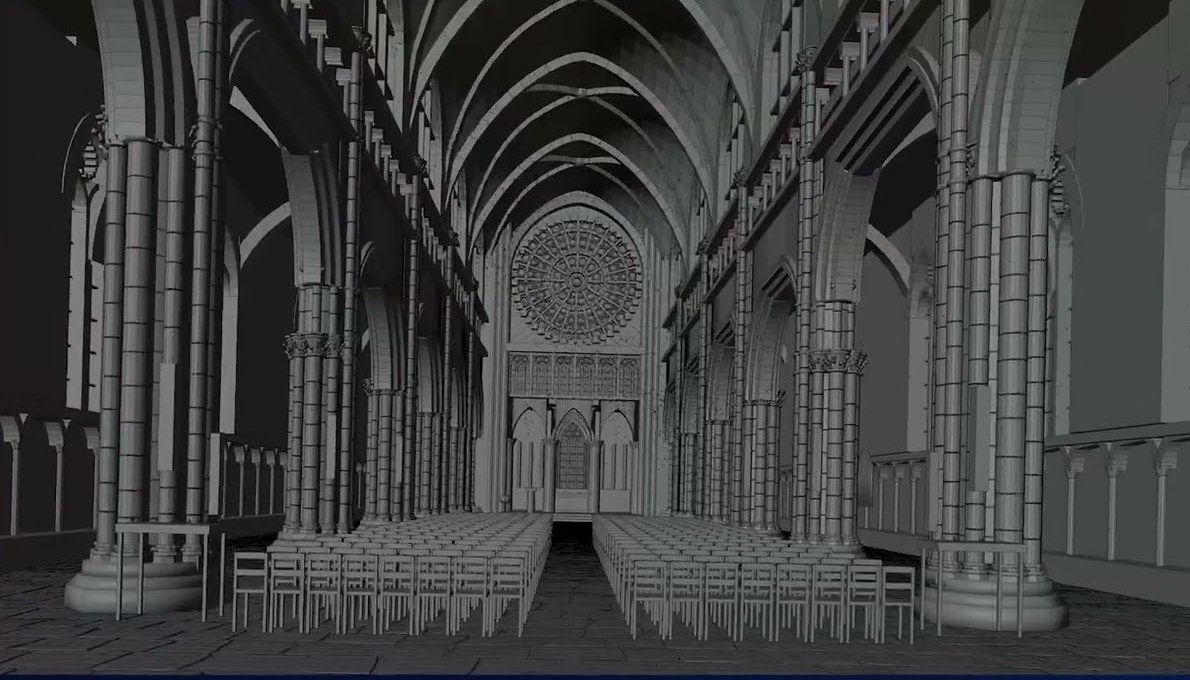
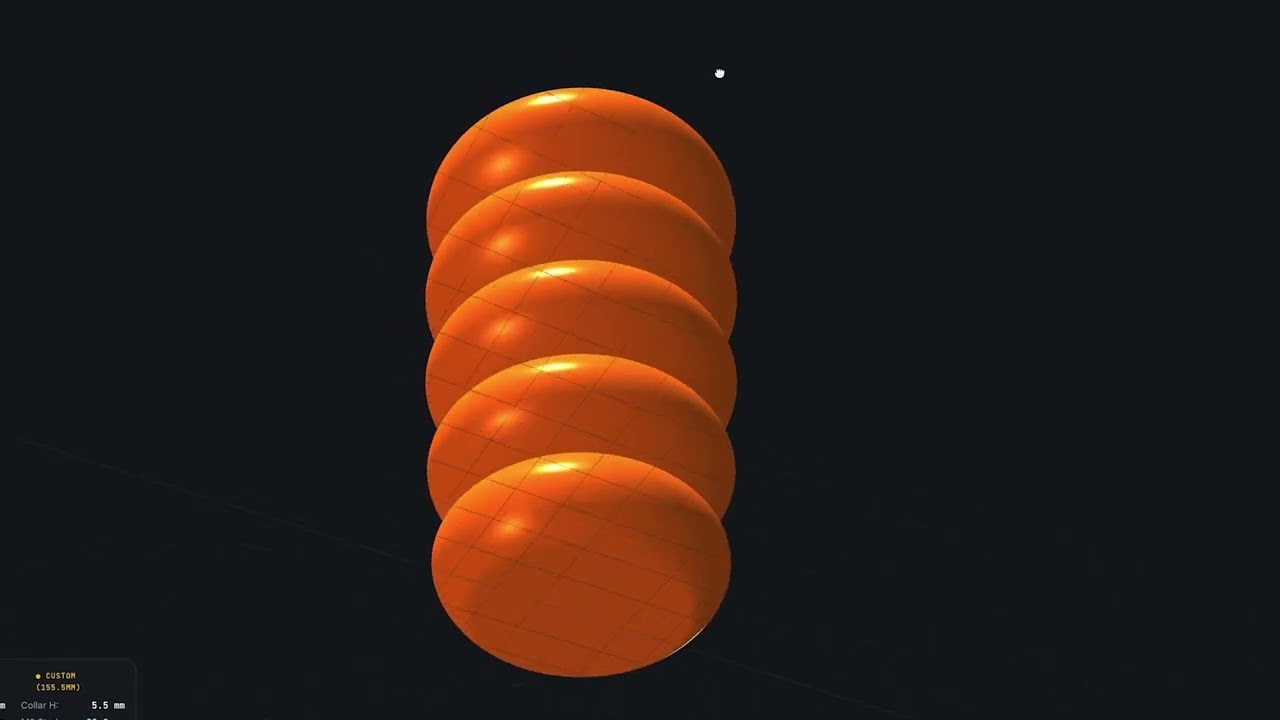
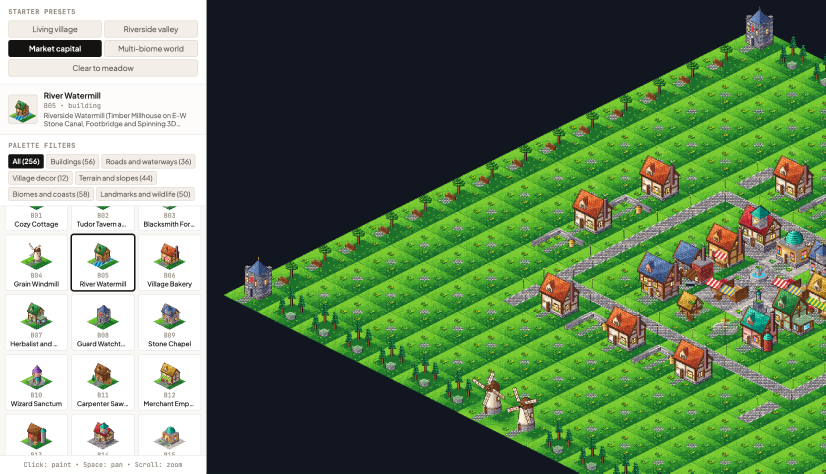
Yang dipajang Google di halaman resminya: Chaco Canyon 3D Ruins, rekonstruksi Pueblo Bonito dari sekitar 50 GB LiDAR dan arsip survei. Desk Racer, meja Googler beneran yang difoto terus jadi sirkuit balap. Wizard Chess 3D dengan shatter physics. Pixel Arcade, yang ngerakit game pixel-art kamu sendiri dari empat pertanyaan. Satu kaki sofa yang didesain dari sketsa ukuran plus foto, sampai jadi file siap cetak 3D. Dan scene katedral gotik yang dibangun Argon sendiri lewat Blender dari satu gambar.
Semua gambar demo di tulisan ini aku ambil dari halaman resmi Google — showcase AI Studio sama video di blog pengumuman mereka. Jadi yang kamu liat di bawah itu hasil Google, bukan hasil aku.
Catatan jujur: aku belum nyobain sendiri. Semua yang aku tulis di atas aku ambil dari pengumuman resmi Google sama laporan benchmark, bukan dari hasil tes aku. Begitu aku udah coba, bagian ini aku update.
Yang mau aku tes nanti satu hal spesifik: kalau dikasih brief yang beneran kompleks, seberapa jauh dia bisa bangun sesuatu yang kepake, bukan cuma demo yang keliatan bagus di video.
Jadi daripada nunggu aku kelar nyobain, aku tulis brief-nya duluan. Empat prompt di bawah ini yang bakal aku pakai, dan kamu bisa jalanin sendiri sekarang.
Empat prompt yang bisa kamu copy langsung
Masalah dari semua demo di atas: yang beredar itu hasilnya, bukan prompt-nya. Jadi aku nulis empat prompt yang nyasar persis ke empat kategori demo itu — sketsa 2D jadi arsitektur 3D, sketsa tangan jadi desain hardware, game pixel-art yang bisa dimainin, sama simulasi interaktif. Copy, tempel, isi bagian dalam kurung siku, kirim.
Kenapa panjang: karena yang ngancurin output model di tugas kayak gini hampir selalu hal yang sama — dia ngarang angka. Dikasih sketsa tanpa skala, dia tetep bakal milih tinggi dinding, dan kalau kamu ga minta dia nyatetin pilihan itu, kamu ga akan pernah tau mana angka yang dibaca dari gambar dan mana yang dikarang. Makanya tiap prompt di bawah maksa tiga hal: ekstrak dulu sebelum bikin, pakai default yang eksplisit kalau datanya ga ada, dan audit sendiri di akhir. Panjangnya bukan buat gaya.
Aku nulis prompt-nya in English. Bukan karena Indonesia-nya ga bisa, tapi instruksi teknis yang padet gini lebih stabil di English, dan kalau kamu mau penjelasannya Bahasa Indonesia, tinggal tambahin satu baris di akhir: "Reply in Bahasa Indonesia, but keep all code, identifiers, and units in English."
Satu lagi yang perlu aku bilang jujur: ini prompt yang aku rancang berdasarkan kategori demo di pengumuman resmi Google, bukan transkrip prompt yang dipakai Google di demo mereka. Aku belum tes empat-empatnya di Argon. Strukturnya sendiri aku ambil dari cara aku biasa nyuruh model ngerjain tugas yang hasilnya harus bisa diverifikasi, dan itu jalan di model mana pun yang bisa nulis file panjang.
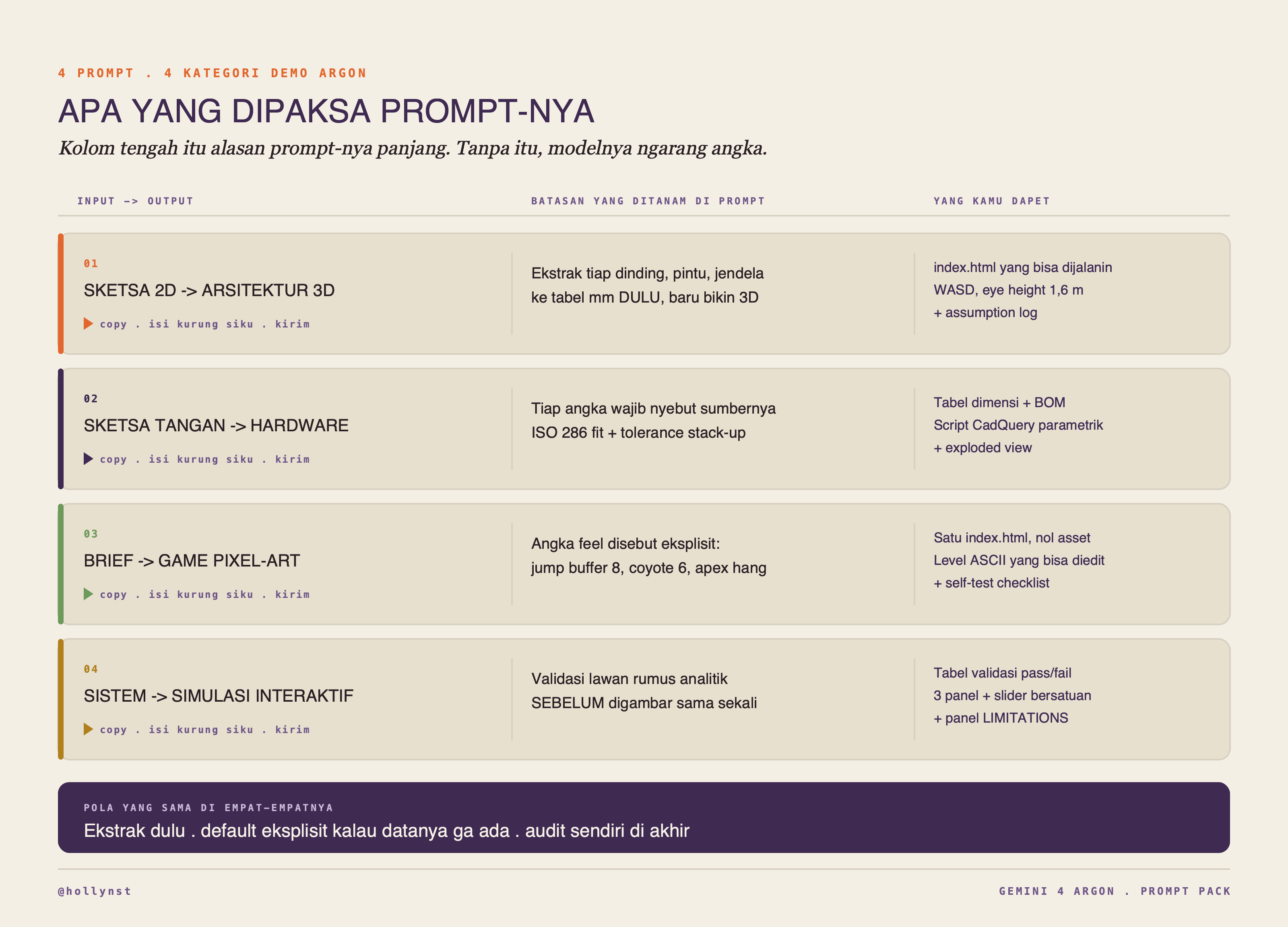
Prompt 1 — sketsa 2D jadi arsitektur 3D
Ini yang paling sering dipajang di demo, dan juga yang paling gampang ngehasilkan sesuatu yang keliatan bener tapi ukurannya ngawur. Floor plan hampir selalu kurang informasi: tinggi dinding ga ada di gambar denah, dan skala sering cuma bisa ditebak dari lebar pintu.
Jadi prompt ini motong kerjaannya jadi empat tahap dan maksa model berhenti di tahap satu buat nunjukin tabel ekstraksi — tiap dinding, pintu, jendela, sama posisinya dalam milimeter — sebelum dia boleh nyentuh 3D sama sekali. Kalau tabelnya salah, kamu ketauan di detik ke-30, bukan setelah dia ngeluarin 800 baris kode.
Yang kamu dapet: satu file index.html yang dibuka dobel-klik, bisa di-orbit, dan bisa kamu jalanin sendiri di dalemnya pakai WASD setinggi mata 1,6 meter. Plus assumption log — daftar tiap angka yang dia karang dan alasannya.
PROMPT 1 · 2D KE 3D ARSITEKTUR
Floor plan atau sketsa jadi model 3D yang bisa dijalanin di browser
Isi: jenis gambarnya di baris INPUT. Butuh: satu gambar denah atau sketsa. Output: tabel ekstraksi, satu file index.html, plus assumption log.
ROLE
You are a senior architectural technologist who turns 2D plan drawings into measured, navigable 3D models. You care about dimensional honesty more than about renders looking pretty. You never invent a dimension silently, and you would rather hand me a plain grey model with a correct assumption log than a beautiful one I cannot check.

INPUT
I am attaching one image: [a 2D floor plan / a hand sketch on grid paper / a scanned CAD printout / a photo of a drawing taped to a wall]. Treat that image as the only source of truth for geometry. Where it is ambiguous, use the DEFAULTS block below and log every single use. Context from me:
  - what the building is: [house / apartment / cafe / office floor / stall]
  - which country, because that sets my conventions: [...]
  - what I want the model for: [checking it feels right at full size / showing a client / taking measurements off it / handing to a contractor]
  - anything in the drawing you should ignore: [furniture, dimension lines, title block, revision clouds]

STAGE 1 - READ THE DRAWING BEFORE YOU MODEL ANYTHING
Output a plain-text extraction table, one row per element you can actually see:
  id | element (exterior wall / interior partition / door / window / opening / stair / column / level change / fixture) | plan position in mm | length | thickness | swing or sill where relevant | note
Then report, explicitly:
  - the drawing scale you detected, and how you detected it: printed scale bar, a dimension string, door-width inference, grid-square pitch, or a known fixture size. Give the number you derived and your confidence in it.
  - floor area per room in m2, plus gross internal area
  - the orientation, if anything in the drawing indicates north
  - every line you could not classify, and what you think it might be
Show me this table first. If more than 15 percent of elements are unclassified, or if you could not establish scale by any method above, stop here and ask me instead of guessing.

STAGE 2 - RESOLVE THE GEOMETRY
Build a clean topological model from that extraction:
  - close every wall loop, snap endpoints that are within 50 mm of each other, merge duplicate collinear segments, and square angles that are within 2 degrees of orthogonal
  - report every snap, merge and squaring you performed, as a list, with the before and after values
  - detect rooms as closed loops and name them from the drawing's labels, or as ROOM-01 onward if unlabelled
  - per room: ceiling height, floor level, whether it is enclosed, and which openings connect it to which neighbour
  - build an adjacency list: room | connects to | via (door, opening, stair)
Then handle the awkward cases explicitly rather than quietly dropping them. For each of the following, say whether it appears in my drawing and what you did: curved or angled walls, splayed window reveals, double-height voids, stairs with winders or landings, level changes within one storey, columns standing free of any wall, walls that do not meet at a corner, and anything drawn in dashed line, which usually means something above or below.

DEFAULTS (only when the drawing is silent, and log each one)
  1 scene unit = 1 metre. Z is up. Origin at the lower-left of the plan bounding box.
  Exterior wall 200 mm, interior partition 100 mm, party wall 180 mm.
  Floor to ceiling 2700 mm, slab 150 mm, so floor to floor 2850 mm.
  Door leaf 900 x 2100 mm. Window sill 900 mm, head 2100 mm, width as drawn.
  Stair riser 175 mm, going 280 mm, width 900 mm, minimum headroom 2000 mm.
  Minimum corridor clear width 1200 mm.
If my stated country makes a different default obviously correct, use that one instead and say so in one line.

STAGE 3 - BUILD IT
Deliver ONE self-contained index.html that runs by double-click. No build step, no local asset files, no CSS framework.
  - three.js imported as an ES module from a CDN, pinned to one exact version through an import map. OrbitControls from that same pinned version. Nothing else.
  - Build walls as segmented boxes around every opening. Do not use CSG, and do not fake openings with transparent textures. I want real holes I can walk through.
  - Renderer: antialias on, outputColorSpace sRGB, ACESFilmic tone mapping, exposure 1.0, soft shadow map at 2048, device pixel ratio capped at 2.
  - Lighting: one hemisphere light (sky 0xdfe8f0, ground 0x9a8f80, intensity 0.6) and one directional sun whose shadow camera is fitted to the model bounding box, not left at the default range. If the drawing gave you an orientation, put the sun where that orientation implies; otherwise put it at azimuth 135 and say you chose it.
  - Camera: perspective, 55 degree fov, near 0.1, far 500. Two modes on a key toggle: orbit, and first-person walk at eye height 1.6 m with WASD, shift to run, and collision against the wall boxes so I cannot clip through a wall. Walk speed 1.4 m/s, run 3.0 m/s, so my sense of distance stays calibrated.
  - Materials: flat and untextured, differentiated only by element class (slab, exterior wall, partition, glazing, joinery, stair). Glazing uses transmission or opacity, never a mirror. No HDRI, no bloom, no depth of field. If it looks like a render, you have gone too far.
  - UI panel, top left: toggle roof, toggle each storey, toggle wireframe, toggle room labels, toggle a 1 m ground grid, reset view, and a click-to-click measure tool that prints the distance in metres to 2 decimals and leaves the last five measurements on screen.
  - Room labels at the room centroid showing name and area in m2, always facing the camera, hidden in first-person mode.
  - A sun-position slider for time of day, so I can see where shadows fall at 09:00, 13:00 and 17:00.
  - Fully parametric: every dimension in the scene must come from one CONFIG object at the top of the script, so changing wall height is a one-line edit. Every room, wall and opening must also exist in a MODEL data object, separate from the code that draws it, so I can edit the data without touching the geometry builders.
  - Performance: the whole model must hold 60 fps on integrated graphics. Merge static wall geometry where it does not break the per-class materials, and say what you merged.

STAGE 4 - AUDIT YOUR OWN OUTPUT
After the code, print:
  a) the assumption log: every dimension you inferred rather than read, the value you chose, and why
  b) a conflict list: anything in the drawing that is geometrically impossible, does not close, or contradicts another part of the drawing
  c) a sanity table: sum of room areas vs gross internal area, and the delta as a percentage. If the delta is over 5 percent, say where the missing area went.
  d) a circulation check: can a 1200 mm wide path reach every room from the entrance, and does any door swing collide with another door or a wall
  e) a headroom check on every stair, with the measured value
  f) three things I should physically re-measure before trusting this model, chosen because they drive the most downstream dimensions
  g) what you would need from me to take this from a massing model to construction intent: which sections, which elevations, which specifications

QUALITY BAR - WHAT I WILL CHECK FIRST
I will open the file, walk through the front door, and compare three things against the drawing: the width of the narrowest corridor, the height of the tallest opening, and the total footprint. If any of those is wrong, nothing else matters. Build with that in mind.

TONE
No preamble, no apology, no restating the brief. Table, model, audit. If one requirement here is impossible, name it in one line and do the rest anyway. If you catch yourself about to write "approximately" in the assumption log, replace it with a number and a reason.
Prompt 2 — sketsa tangan jadi desain hardware
Demo yang ini paling berani, karena di bagian mekanikal nebak itu mahal. Lubang yang kurang 0,05 mm artinya part-nya ga masuk, dan kamu baru tau setelah bayar CNC.
Makanya prompt ini ga minta "desain". Dia minta sepuluh hal spesifik, dan tiga di antaranya yang beneran penting: tabel dimensi parametrik di mana tiap angka harus nyebut sumbernya (diukur, disketsa, ditebak, atau dari standar), kelas fit ISO 286 per pasangan part dengan clearance minimum dan maksimumnya, dan tolerance stack-up worst-case plus RSS buat rantai dimensi yang menentukan.
Bagian yang paling kepake nomor sepuluh: dia harus nyebut tiga cara desain ini gagal di minggu pertama, satu dimensi yang wajib kamu ukur sendiri sebelum keluar duit, dan satu hal di sketsa kamu yang ga masuk akal dan dia diem-diem perbaiki. Yang terakhir itu yang paling sering bikin kaget.
Outputnya dua file: script CadQuery yang parametrik, sama exploded view three.js buat ngecek ada yang tabrakan apa ga.
PROMPT 2 · SKETSA KE DESAIN HARDWARE
Sketsa tangan jadi desain mekanikal lengkap sama fit dan clearance
Isi: fungsi part, jumlah unit, proses produksi, lingkungan, dan satu dimensi yang kamu ukur sendiri. Output: tabel dimensi, analisis fit dan stack-up, BOM, script CadQuery, exploded view.
ROLE
You are a mechanical design engineer running a first-pass detail design review. Be pedantic about tolerances. Do not invent a dimension without labelling it as an assumption. Assume I will actually make this part, and that a wrong number costs me money and a week.

INPUT
Attached: one image, a hand sketch of the part or assembly. Context from me:
  - what it has to do, in one sentence: [...]
  - what it attaches to, and how: [...]
  - quantity: [one-off prototype / 50 units / 10,000 units]
  - process I actually have access to: [FDM 3D print / SLA resin / CNC aluminium / laser-cut sheet metal / injection moulding]
  - environment: [indoor ambient / outdoor -10 to 50 C / wet / food contact / vibration / UV]
  - expected load: [static weight in kg / repeated impact / hand force only / unknown]
  - the one dimension I truly measured: [e.g. the bore has to fit a 12.00 mm shaft]
  - what I will accept: [must be rigid / can flex slightly / must be removable without tools]

UNITS POLICY
Millimetres to 2 decimals, everywhere. Angles in degrees. Forces in newtons, torque in N*m, stress in MPa. If I hand you an imperial number, convert it, show the conversion, and keep working in mm. Never mix units inside one table.

DELIVER, IN THIS ORDER

1. WHAT YOU THINK YOU ARE LOOKING AT
   Before any numbers: describe the part in three sentences, name every feature you can identify, and state what you believe each feature is for. If you are wrong about the intent, everything downstream is wrong, and I would rather catch it in sentence two than in step nine.

2. PARAMETRIC DIMENSION TABLE
   param | nominal | tolerance | source (measured / sketched / inferred / standard) | why this value
   Every number used anywhere downstream must appear in this table. Nothing hardcoded later that is not here. Mark with a star any parameter that, if wrong by 10 percent, changes whether the part works at all. Those are the ones I will go measure.

3. FITS
   For each mating pair: pair | hole | shaft | ISO 286 fit class (e.g. H7/g6) | min clearance | max clearance | interference risk.
   Say in plain words what each fit is for: free running, locating, or press. If my process cannot hold the tolerance that fit needs - and FDM cannot hold H7 - say so and give me the fix: ream after printing, press in a bushing, design in a compliant feature, or relax the fit and accept the slop. State the printed-hole shrinkage you are compensating for, and the number you used.

4. TOLERANCE STACK-UP
   Pick the two or three dimension chains that actually matter. For each: list the contributors in order, then give both the worst-case stack and the RSS (root sum square) stack, with the arithmetic shown. Tell me which one to design to given my stated quantity, and why. Flag any chain where worst-case produces interference or drops clearance below the stated minimum, and propose the single cheapest change that fixes it.

5. GD&T, LIGHTLY
   Name the datum features, in order A, B, C, and say why you picked them. Then call out only the controls that matter: perpendicularity, position, flatness, concentricity, with values. Do not decorate the part with symbols. Three good callouts beat fifteen decorative ones. Add surface finish where it affects function, in Ra, and say which faces do not care.

6. CLEARANCE, MOTION AND ASSEMBLY
   For every moving part: swept volume, minimum clearance at the tightest point, clearance at full travel.
   For every fastener: the driver access envelope, the tool you would use, and whether a human hand can physically reach it.
   For the assembly as a whole: write the assembly sequence as numbered steps, and confirm each step is physically possible in that order. Say which part gets trapped if the order is wrong. Say which step needs a third hand, and what fixture would replace it.
   Then say how it comes apart for service, or that it does not.

7. LOADS, ROUGHLY BUT HONESTLY
   Identify the governing load case and justify it in one line. Do the hand calculation and show the formula and the substitution, not just the answer: bending stress, bearing stress at the pin or boss, thread pull-out length, and the screw torque needed for preload. Compare each against material yield and state the factor of safety. Then label every result as either a real calculation or an order-of-magnitude estimate that needs FEA before anyone relies on it. If you are estimating a load because I did not give you one, say the number you assumed and how sensitive the answer is to it.

8. MATERIAL AND FASTENERS
   Two material options, with the tradeoff in one line each: stiffness, cost, temperature, UV, fatigue. Name the specific grade, not the family. Fasteners by standard designation (e.g. M4 x 0.7 x 12, ISO 4762, property class 8.8), recommended torque, and whether a threaded insert is required - which for FDM it usually is. Say which fastener you would delete if you had to delete one.

9. DFM FOR THE PROCESS I NAMED
   Minimum wall thickness, draft, radii, hole orientation relative to build or tool axis, support strategy, warp and shrink risk, and what you would change about my sketch purely so it can be made. Be specific to that one process, not generic advice. Then state the print or machining orientation you recommend and which direction the part will be weakest in as a result, because that is the direction it will break.

10. BOM AND ROUGH COST
   item | qty | spec | class of supplier (describe the class, do not name a brand) | note
   Then an order-of-magnitude cost per unit at my stated quantity, broken into material, process and fasteners, each marked as a real quote range or a guess.

11. TEST PLAN
   Three tests I can run on the first physical part, in the order I should run them, each with the pass criterion as a number and the tool I need. Start with the cheapest test that can kill the design.

12. RED TEAM YOUR OWN DESIGN
   The three most likely ways this fails in its first week of real use, ranked. The one dimension I should measure on the physical thing before I spend money. And the one thing in my sketch that does not make sense, which you quietly corrected without telling me.

13. TWO FILES
   a) a parametric CAD script in CadQuery (Python) that builds the part from the dimension table, with every value read from one dict at the top and a comment tying each value back to its table row. Include an assert for every clearance that must stay positive, so the script fails loudly rather than producing an interfering part.
   b) one self-contained index.html with a three.js exploded view: a slider drives explosion distance, clicking a part shows its dimension-table row, three.js pinned to an exact version via import map, no local assets.

If any of these thirteen needs data I did not give you, name it, say what you need and why it matters, and complete the rest. Do not pad a section you cannot do honestly.
Prompt 3 — game pixel-art satu file yang beneran enak dimainin
Model mana pun bisa ngeluarin platformer yang jalan. Yang bikin beda itu feel-nya, dan feel itu bukan selera — itu daftar angka yang spesifik.
Jadi prompt ini nyebut angkanya langsung: fixed timestep 60 Hz pakai accumulator biar simulasinya deterministik, jump buffer 8 tick, coyote time 6 tick, apex hang di puncak lompatan, collision swept AABB yang diselesaikan satu axis dulu baru axis kedua biar kamu ga nyangkut di sambungan tile, kamera pakai deadzone plus lookahead yang disnap ke pixel bulat biar ga getar. Itu semua hal yang ga akan muncul kalau kamu cuma minta "bikin game platformer".
Batasan yang bikin dia jadi satu file: ga ada asset sama sekali. Sprite ditulis di source sebagai array index palet dan digambar ke offscreen canvas saat boot, suaranya disintesis WebAudio, palet dilock 16 warna. Level-nya string ASCII biar kamu bisa ngedit sendiri tanpa baca kodenya.
Dan baris terakhir prompt itu penting: jangan kasih skeleton isi TODO, jangan berhenti di tengah nanya mau lanjut apa ga. Dua itu kebiasaan yang paling sering bikin output panjang jadi ga kepake.

PROMPT 3 · GAME PIXEL-ART SATU FILE
Platformer yang bisa dimainin, satu index.html, tanpa asset apa pun
Isi: genre sama tema. Output: satu file yang dibuka dobel-klik, level ASCII yang bisa kamu edit, plus checklist self-test.
ROLE
You are a gameplay engineer shipping something small, tight, and finished. Finished beats big. If scope has to be cut, cut content - never cut feel. You have shipped enough to know that the difference between a demo and a game is about forty small decisions, and you are going to make all of them explicitly.

GOAL
One self-contained index.html that I open by double-click and play immediately. No build step, no npm, no external asset files, no CDN, no web fonts. Everything procedural or inline.

THE GAME
  genre: [2D precision platformer / top-down arena / grid puzzle]
  theme: [...]
  target session: 3 to 5 minutes, 6 to 8 screens of content, one final room
  difficulty: the first screen must be impossible to fail, and the last must take most people three tries
  content rating: no gore, playable by a 10 year old

ART, WITH NO ASSET FILES
  Logical resolution exactly 320 x 180, integer-scaled to the window and letterboxed. No fractional scaling ever.
  Canvas 2D with imageSmoothingEnabled false, plus image-rendering: pixelated in CSS.
  Sprites defined in source as arrays of palette indices, drawn once into offscreen canvases at boot, then blitted. No base64 PNGs, and no procedural noise standing in for actual art.
  A locked 16-colour palette listed as hex at the top of the file, each with a one-word role. Nothing in the render path may use a colour outside it. Pick a palette with at least three values dark enough to read as background and two bright enough to read as danger.
  Animation driven by per-entity frame tables with durations in ticks, not milliseconds.
  Tile art must make the collision shape obvious: if a tile is solid, it must not look like a tile that is not.
  One parallax background layer, scrolling at a different rate, built from the same palette.

FEEL - THIS IS THE PART THAT MATTERS
  Fixed timestep simulation at 60 Hz with an accumulator. Rendering decoupled and interpolated. The simulation must be deterministic given the same input sequence, and you should be able to say in one line why.
  Input polled into a buffer. Implement jump buffering of 8 ticks, coyote time of 6 ticks, variable jump height on early release, and a maximum of one tick of input delay.
  Movement with separate ground and air acceleration, separate friction values, terminal velocity, and a short apex hang where gravity is reduced near the top of the arc. Give me the actual numbers in a TUNING object, in pixels per tick, with a comment on each saying what it changes when I raise it.
  Collision: swept AABB against a tile grid, resolved one axis at a time, X then Y, with corner correction so I never snag on a seam between two flush tiles. No tunnelling at maximum fall speed. One-way platforms must let me jump up through them and drop down with a held down input.
  Camera follows with a deadzone box plus velocity lookahead, clamped to level bounds, and snapped to whole logical pixels so nothing shimmers.
  Juice: squash and stretch on landing, 4 ticks of hit-stop on damage, screen shake with a hard magnitude cap, a single-frame white flash, and dust particles on land and on turn. All of it behind one reduceMotion flag that genuinely disables it rather than halving it.
  Death and restart must be under 400 ms end to end. A player who dies should already be moving again before they have time to feel annoyed.

SOUND, WITH NO FILES
  WebAudio synthesized at runtime: jump, land, hit, pickup, death, menu move, and one 8-bar loop built from oscillators plus a noise buffer. Create the AudioContext on the first user gesture, never before. Separate music and SFX volume, both persisted. Pitch-vary repeated sounds slightly so the pickup sound does not become a drill.

STRUCTURE
  An explicit state machine: BOOT, TITLE, PLAY, PAUSE, DEAD, WIN. Pause must actually freeze the accumulator, not just stop drawing.
  Levels as ASCII strings in a LEVELS array, one character per tile, with the legend written as a comment directly above them, so I can edit a level in a text editor without reading any of your code. Each level string must be rectangular, and the loader must throw a clear error naming the row if it is not.
  Three enemy types with genuinely different behaviour: one patroller that turns at ledges, one that reacts to line of sight within a stated range, and one that constrains where I am allowed to stand rather than chasing me. Each needs telegraph frames before it can hurt me, and the telegraph must be visible in one glance at 320 x 180.
  One final room that reuses the three enemy types in combination rather than introducing a new mechanic. Boss fights that teach new rules at the end are unfair.
  A difficulty curve written out as a table: screen number | the one thing it teaches | the mechanic it combines with | expected deaths.
  Best time and death count in localStorage, wrapped in try/catch, because private windows throw on access.
  A debug overlay on the backtick key: fps, tick count, entity count, hitboxes, camera deadzone, player velocity, and a live tile-coordinate readout.

ACCESSIBILITY
  Remappable keys with both arrows and WASD working by default, optional gamepad, full keyboard-only play including the menus, never colour alone to distinguish danger from floor, and a clearly visible pause state. Add an assist toggle that slows the simulation to 75 percent without changing any tuning constant, and say in the UI that it is on.

PERFORMANCE BUDGET
  Holds 60 fps on integrated graphics at 1080p. No allocation in the per-tick hot path: pool entities and particles, and no per-frame object literals inside the collision code. One canvas, one context, no DOM elements updated per frame.

ANTI-PATTERNS - DO NOT DO THESE
  Do not use requestAnimationFrame delta time directly as the simulation step.
  Do not put game logic in the render function.
  Do not scale the canvas with CSS transforms and call it pixel-perfect.
  Do not use setTimeout for anything that affects gameplay timing.
  Do not reference an image or font file that does not exist in the HTML.

AFTER THE CODE, WRITE
  a) HOW TO EDIT A LEVEL, in five lines, for someone who does not read JavaScript
  b) the tuning constants worth changing first, each with the range that still feels good and what breaks outside it
  c) a self-test checklist with pass or fail per item, and actually reason through each one: does the player tunnel at max fall speed, does the jump buffer fire on the frame before landing, does coyote time let me jump after walking off a one-tile ledge, does pausing drift the clock, does the camera shimmer on diagonal movement, does every level string parse, does the console stay clean from boot to win
  d) the three places a player is most likely to get stuck or confused, and what you did about each
  e) what you cut, and what you would add with one more hour

Write the entire file. Do not hand me a skeleton full of TODOs, do not stop halfway to ask whether you should continue, and do not summarise what you are about to write before writing it.
Prompt 4 — simulasi interaktif yang divalidasi, bukan animasi lucu
Ini bagian yang paling gampang ketipu. Simulasi yang salah tetep keliatan meyakinkan, karena yang gerak-gerak udah cukup bikin orang percaya.
Jadi prompt ini naruh validasi sebelum visualisasi. Tahap satu: tulis persamaannya, definisiin tiap simbol beserta satuannya, dan sebut dengan spesifik apa yang model ini secara struktural ga bisa gambarin — bukan "ini disederhanain" tapi "ini nganggep percampurannya instan, jadi dia ga bisa nunjukin gelombang spasial".
Tahap dua, yang ga boleh dilewat: cari kasus batas yang jawabannya ada rumus tutupnya, bandingin hasil numeriknya sama rumus itu, terus lapor drift besaran yang seharusnya kekal selama 10.000 step dalam persen. Kalau ada yang gagal, biarin gagal dan laporin — jangan dilonggarin toleransinya biar lulus. Kalimat itu aku taruh di prompt-nya persis karena itu hal pertama yang model lakuin kalau ga dilarang.
Baru setelah itu dia bikin UI-nya: slider per parameter lengkap sama satuan, empat preset buat empat rezim beda, sumbu yang berlabel dan ga dipotong biar trennya keliatan lebih dramatis, plus panel LIMITATIONS yang kelihatan di layar, bukan disumput di komentar kode.

PROMPT 4 · SIMULASI INTERAKTIF
Sistem yang kamu mau ngerti jadi simulasi yang divalidasi dulu sebelum digambar
Isi: sistemnya, pertanyaan yang mau dijawab, audiens, level matematika kamu. Output: persamaan plus asumsi, tabel validasi, satu file index.html bertiga panel.
ROLE
You are a computational scientist who builds explorable explanations. Your standard: a reader who disagrees with you can poke the model until they see why it behaves the way it does. A pretty animation that hides its equations is a failure, and a simulation that cannot be checked against anything is just an opinion that moves.

WHAT I WANT TO UNDERSTAND
  the system: [e.g. a damped driven pendulum / SIR epidemic with waning immunity / a single-server queue at a till / compound returns with irregular contributions / heat diffusion along a rod / predator and prey]
  the question the simulation has to answer: [...]
  the decision I will make with the answer, if any: [...]
  audience: [just me / my students / a non-technical client]
  my maths level: [comfortable with calculus / rusty / none]
  real numbers I already have, if any: [...]

STAGE 1 - STATE THE MODEL, IN WORDS AND IN MATHS, BEFORE ANY CODE
  Write the governing equations in plain text, and define every symbol: name, meaning, unit, plausible range, typical value, and where that typical value comes from.
  Write one paragraph, aimed at my stated maths level, explaining what the equations say in words. If my level is "none", that paragraph is the one I will actually read, so make it carry the real content rather than hedging.
  List the assumptions, numbered. For each one, say what breaks in the real world when it is violated, and whether violating it makes the model optimistic or pessimistic.
  State what this model structurally cannot represent. Be specific. Not "it is simplified" but "it assumes instantaneous mixing, so it cannot show a spatial wave".
  Choose the numerical method and defend it in two lines: why RK4 rather than Euler here, or why the stiffness forces an implicit solver. Give the timestep stability condition as an inequality with numbers substituted in, and state the timestep you will use and how much margin that leaves.
  Name the dimensionless group or groups that actually govern the behaviour, if there are any, and say what each one trades off. Half of understanding a system is learning that two of its five knobs are the same knob.

STAGE 2 - VALIDATE BEFORE YOU VISUALISE
  Find a limiting case with a known closed-form answer: small-angle, zero damping, infinite capacity, R0 below 1, constant contributions. Write the analytic solution out. Then state the numerical error you expect against it, and the tolerance you will accept before calling it a bug.
  Name a conserved quantity or invariant. If energy should be conserved, report the drift over 10,000 steps as a percentage, and say what level of drift you would treat as a defect rather than as rounding.
  Do a convergence check: halve the timestep, report how much the answer moves, and say whether that is consistent with the order of the method you chose. If it is not, your integrator has a bug and you should find it before continuing.
  Check the units of every equation by dimensional analysis and say so in one line.
  Name one qualitative behaviour the simulation must reproduce or it is simply wrong: period doubling, a second wave, a queue growing without bound above utilisation 1, an equilibrium the system returns to after a kick.
  Run a sensitivity pass: vary each parameter by plus and minus 10 percent, report which ones move the answer most, and rank them. That ranking tells me which number is worth measuring properly in the real world and which one I can keep guessing at.

STAGE 3 - BUILD IT
  One self-contained index.html. No build step, no external libraries, no CDN. Canvas 2D for everything, including the plots. Do not reach for a charting library.
  Three panes: the system animating, time series of every state variable, and a phase-space or distribution view wherever that is meaningful.
  Every parameter gets a slider with a label, a unit, a live numeric readout, a defensible min and max, and a step fine enough to be useful. Decide explicitly what happens when a parameter changes mid-run - hot-apply or restart - and make the UI say which. Any slider whose range crosses a qualitative boundary must mark that boundary on the track.
  Four named preset scenarios, each demonstrating a different regime, each with one line telling me what to watch for. At least one preset must show the model misbehaving at the edge of its validity, labelled as such.
  Controls: play, pause, step one timestep, reset, speed multiplier, and a visible readout of simulated time and step count.
  Every plot gets labelled axes with units and real tick values. No unlabelled axes, no y-axis truncated in a way that exaggerates a trend, and state whether each scale is linear or log. If a quantity can go negative, the zero line must be visible.
  A LIMITATIONS panel visible in the UI, not buried in a code comment, restating the Stage 1 assumptions in plain language.
  Deterministic given a seed. If there is randomness, implement a seeded PRNG, display the seed, let me change it, and add a button that runs 100 seeds and shows the spread, because one stochastic run is an anecdote.
  Keep model, integrator, and rendering in three clearly separated sections, so I can swap the model without touching the draw code. The model section must be a pure function from state and parameters to derivatives, with no drawing and no globals.
  Export: a button that dumps the current run as CSV to the clipboard, so I can check your numbers in a spreadsheet.

STAGE 4 - REPORT
  Print the validation results as a table: check | expected | measured | pass or fail. Include the analytic comparison, the invariant drift, and the convergence check. If something fails, leave it failing and say so - do not loosen the tolerance to get a pass, and do not quietly change the test.
  Print the sensitivity ranking as a table: parameter | plus 10 percent effect | minus 10 percent effect | rank.
  Answer my original question in five sentences or fewer, citing the exact parameter values you used to get there, and state how confident you are given the assumptions.
  Give me three experiments to run with the sliders, each phrased as a prediction I should commit to before I drag anything. A good one has a result that would surprise me if I am wrong.
  Say one thing the simulation showed you that the equations alone did not make obvious.
  Say what you would build next if this model turned out to matter: what assumption you would relax first, and what data you would need to relax it.

Numbers before adjectives. If any part of this is beyond what you can do honestly, name that part in one line and do the rest. Do not describe the plan before executing it.
Kalau hasilnya kelihatan bener tapi ternyata salah
Ini yang paling sering kejadian di tugas kayak gini, dan reaksi refleks kita biasanya salah: kita bilang "ini error", terus modelnya nulis ulang seluruh file dari nol. Hasilnya bug lamanya ilang, bug barunya muncul, dan kamu ga belajar apa-apa soal penyebabnya.
Prompt pendek di bawah ini buat ngehentiin pola itu. Dia maksa dua hipotesis dulu, satu tes murah buat misahin keduanya, dan baru nambal setelah kamu lapor hasil tesnya.
FOLLOW-UP · KALAU HASILNYA SALAH
Suruh dia cari penyebabnya dulu, jangan langsung nulis ulang
Isi: gejalanya sespesifik mungkin, termasuk angka yang kamu dapet dan angka yang kamu harapin.
The build runs but it is wrong in a specific way: [describe exactly what you see, including the number that is off and the number you expected].

Do not rewrite the file. Instead:
1. Name the single most likely cause, and the line or function it lives in.
2. Name the second most likely cause, so I can tell them apart.
3. Give me one cheap diagnostic I can run in 30 seconds that distinguishes cause 1 from cause 2 - a console log, a constant to change, a value to print on screen.
4. Wait for my result before patching.
Then, once I report back, give me only the changed lines with three lines of context either side, and state what observable behaviour should change if the fix worked.
Sebelum kamu percaya outputnya
Empat prompt di atas dirancang biar hasilnya bisa diperiksa, bukan biar hasilnya bener otomatis. Bedanya penting.
Yang perlu kamu cek sendiri tiap kali: assumption log-nya ada beneran, atau dia cuma nulis "assumptions: standard values" tanpa daftar. Angka di tabel ekstraksi cocok sama yang kamu liat di gambar. Dan bagian validasi di prompt 4 beneran ngelapor angka yang gagal, bukan cuma deretan pass yang kelewat mulus.
Model yang ngelewatin bagian audit itu belum tentu ngasih kode yang salah. Tapi dia ngasih kode yang ga bisa kamu pertanggungjawabin, dan buat kerjaan yang dimensinya bakal dipotong di CNC atau dibangun di lapangan, dua itu beda jauh.
Buat sekarang, Argon udah bisa dipakai lewat app Gemini kalau kamu pengguna Google AI Pro atau Ultra. Lewat API harganya 2 dolar per juta token input dan 10 dolar per juta token output.
Kalau kamu cuma mau satu kalimat: dia kuat buat kerjaan panjang dan multi-langkah, dan angka nomor satunya itu nyata tapi cuma di satu benchmark.
Written by Holly in Beijing. Notes get longer as I learn more. If you spot something off, find me in the footer.